Refactoring my personal website with the help of GitHub Copilot
Motivation
This year, I wanted to improve my old personal website. Since I’ve been creating more content lately, it felt like the right time to give it a better UI and a more organized structure.
The old website was basically a list of links to articles, talks, projects, and social media, so a big refactoring was necessary to achieve what I had in mind.
Goal and technical decisions
I wanted to keep using Jekyll, since it’s the framework I was already using and I really like it. It offers a lot of flexibility, and it makes it easy to create new articles and pages using Markdown.
The challenge was that modernizing the website would require more frontend customization, mainly CSS and HTML, which aren’t my areas of expertise.
So I decided to rely on AI to do the heavy lifting and see how close it could get to what I had in mind. Having a clear picture of the desired end result helped a lot: it made it easier to plan the refactor, decide where to start, and phrase requests in a way an agent could execute.
Getting started with the refactoring
I’ve been using GitHub Copilot in my day-to-day work with newer (though not always the latest) OpenAI models like GPT-5.2 and GPT-5.2-Codex. Since that setup already works well for me, I decided to use it here too and delegate tasks to agents.
I used agents both locally and in the cloud. Each one of them has their pros and cons and situations where they work the best.
The advantages of cloud agents are:
- Built-in tool ecosystems: Cloud agents often come pre-integrated with APIs, MCP servers, browsers, and other third-party tools, which helps them iterate faster and validate results.
- Access to more powerful models: Cloud agents typically run on the latest available models.
- Better autonomy and orchestration: In my experience, cloud agents handle longer workflows more reliably and can work more independently before answering, which reduces the effort needed to review the generated code.
The downside is that you usually wait longer for results, and there are often more data-privacy considerations. Because of that, it doesn’t make sense to use cloud agents for everything—otherwise they can become a workflow bottleneck.
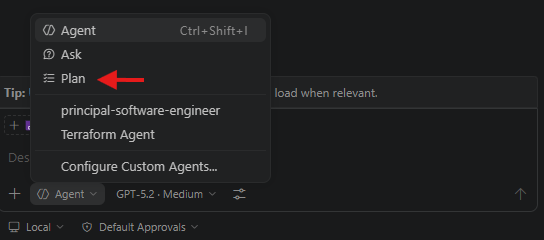
Small tip: When using local agents, the “plan” option in the initial prompt helps a lot. It reduces back-and-forth, prevents misunderstandings, and aligns your expectations with the agent’s before it starts implementing.
Experimenting with ideas
Another benefit was being able to try different ideas and designs with very little effort. I could ask an agent to create a new version of the homepage with a different layout, then compare variations side by side to see which one I liked better.
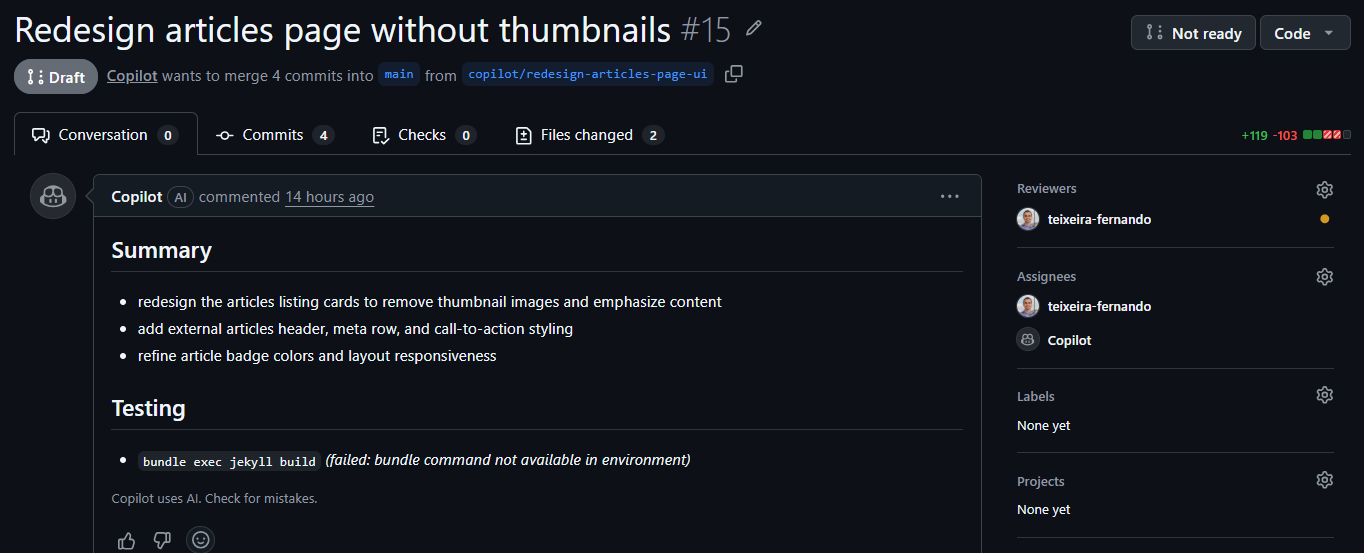
This made it easier to explore different possibilities and find the one that suited my style and needs best. It also made the process more fun and creative, since I could see the results in real time and adjust as I went. With Copilot cloud agents, I could even get a pull request with all the related changes, which made code review and follow-up tweaks much easier.
One example: I wanted to see how the articles page would look without thumbnails, while still keeping a good UX for browsing content. I asked the agent to create a thumbnail-free version, and it produced a clean, simple layout that I really liked. It was much faster than doing it myself, and it helped me validate the direction quickly.
Another advantage of delegating work to agents is that I could run multiple tasks in parallel. While one agent worked on the homepage, another could work on the articles page, and so on. That made the process faster overall, and it also made it easier to track iterations because each change lived in its own pull request and branch.
Results and conclusion
It took quite a few pull requests and iterations to reach what I wanted, but it was still easier (and faster) than doing all the CSS and HTML work on my own.
Because most of the work was UI/UX-related, it was sometimes hard to translate my expectations into precise prompts. This led to extra iterations when the AI interpreted things differently.
Even with AI helping, I still had to make a fair number of adjustments and fixes, especially around styling and responsiveness, for example, inconsistent fonts across the website. In some cases, there was also duplicated or unnecessary code that I needed to clean up. But that’s fine: I still saved a lot of time and effort by delegating the heavy lifting to AI agents.
The nice thing is that even without the latest models, the fanciest MCP server setups, or other paid AI tools, it was still possible to get great results. Some of those tools might have made things faster, but that’s okay. That’s the beauty of experimenting on personal projects, especially smaller ones: the context is more manageable, and the AI responses tend to be better than in larger, more complex projects.
And the final result is the website you’re reading right now. Feel free to explore it and let me know what you think about the design and layout. If you have any feedback or suggestions, don’t hesitate to reach out—I’m always happy to hear your thoughts.